
Brand Mentions: see who's talking about your brand
Brand Mentions automatically surfaces the creators who are posting about your brand on Instagram, TikTok and YouTube, so you can spot organic advocates and turn them into partners. Use it when you want to find creators already talking about you, without having to search for them yourself.
Where to find Brand Mentions
Brand Mentions lives under Signals, alongside Competitors, Hashtags, and AI Search.
- From the InfluenceKit navigation, open Signals.
- Select the Mentions tab.
If you don’t see Signals, it isn’t turned on for your account yet. Reach out to support and we can enable it.
How automatic tracking works
Unlike competitor tracking, you don’t add anything to monitor your own brand — you just tell InfluenceKit your Instagram handle.
- The first time you open the Mentions tab without a handle on file, you’ll see a short form asking for it. Enter your Instagram handle (without the @) and save.
- From there, InfluenceKit checks the posts it tracks (creators on InfluenceKit, posts in campaigns, and public posts it has collected) for an @-mention of that handle in a caption or a story, and adds them to the Mentions tab on its own. DMs aren’t included.
- The data refreshes on its own over time, so the list grows as new mentions are detected. There’s nothing to add or schedule.
Brand Mentions covers the creators InfluenceKit tracks, not every post on a platform. A tool like Sprout Social or Talkwalker covers the wider web.
TikTok and YouTube
Mentions also reads the TikTok and YouTube videos of creators who have connected those accounts to InfluenceKit. A video counts when its TikTok caption, or its YouTube title or description, has one of these:
- an @-mention of one of your handles
- one of your hashtags, such as
#yourbrand - your brand name, as a whole word
Each row shows the platform under the creator’s handle, and how the video matched (Hashtag or Brand name) under its type. Use the Platform filter above the table to see one platform at a time. The filter appears once you have mentions on more than one platform.
A short or everyday brand name is held to a stricter rule, because people use those words for other things. If your brand is called “Ember”, a caption about “ember-roasted leeks” isn’t about you. A name like that only counts when one of your product words sits next to it (“the Ember pizza oven”), or when the video uses your handle or a hashtag you listed.
Watching more than one handle, name or hashtag
If creators tag you under more than one account (a company with several brands, or a regional account), add the others under Also watch at the top of the Mentions tab, separated by commas. InfluenceKit watches all of them, shows which handle each post tagged, and looks back over the last 30 days for the new ones right away.
The Names and hashtags box next to it takes the brand names and hashtags to look for in TikTok and YouTube videos, also separated by commas: Sister Brand, #sisterbrand. List every name you sell under. Start a hashtag with #; anything else is read as a name.
Reading the Mentions table
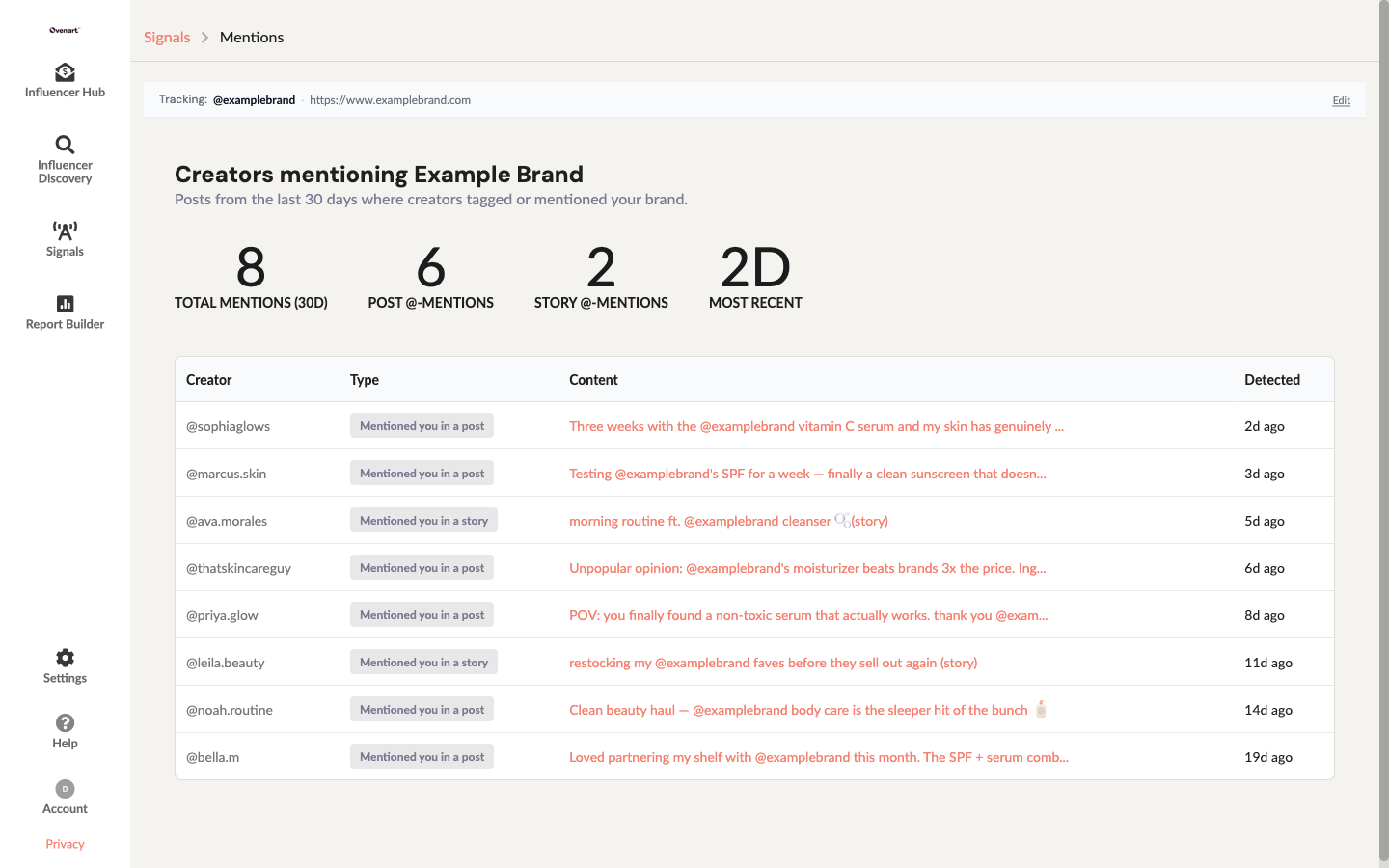
The Mentions tab shows posts from the last 30 days that mentioned your brand, with four summary numbers at the top: total mentions, post @-mentions, story @-mentions, and when the most recent one happened. Once you have video mentions, posts and stories share one number and videos get their own.
Below that, each row shows:
- Creator — the creator’s handle, with the platform under it.
- Type — whether it was a post, a story or a video mention.
- Content — the caption (or a link to the post if there’s no caption) so you can see what they actually said.
- Posted — when the post went up.
By default you’re looking at earned mentions — organic posts from creators who aren’t currently working with you. If you have no earned mentions in the last 30 days, the page opens on partnership mentions instead. If a mention comes from a creator in one of your active campaigns, it’s split out into a separate partnership mentions view instead, since that’s paid work rather than organic discovery; a banner links you between the two when both exist.
Tips
- Brand Mentions is most useful for spotting unpaid, organic advocates — creators posting about you without a formal partnership. They’re often your warmest outreach targets.
- If the tab is empty, confirm your Instagram handle is entered correctly, and give automatic tracking time to run. New mentions are added as they’re detected.
- Pair Brand Mentions with the Competitors tab to compare your earned coverage against the creators working with brands like yours.